
Your Copy-Paste Foundation for Better AI Outputs
Stop Talking to AI Like It’s Google
You typed a quick question into ChatGPT, hit enter, and got back a beige wall of text that said a whole lot of nothing. We’ve all been there. That’s not the AI being dumb. That’s the oldest rule in the book showing up to collect: garbage in, garbage out.
Here’s the thing nobody tells you. AI is not a search bar. When you treat it like one, it gives you search-bar energy. Vague, generic, forgettable. If you want sharp, specific, sounds-like-a-pro-wrote-it results, you have to bring structure to the conversation.
That structure has a name. We call it the Prompt Stack.
Think of it like a recipe you keep saved in your notes app. Four layers you stack together every time you start a new AI conversation. Copy, paste, tweak, go. Once you have it, you stop fighting with the AI and start directing it.
The 4 Layers of a Prompt Stack
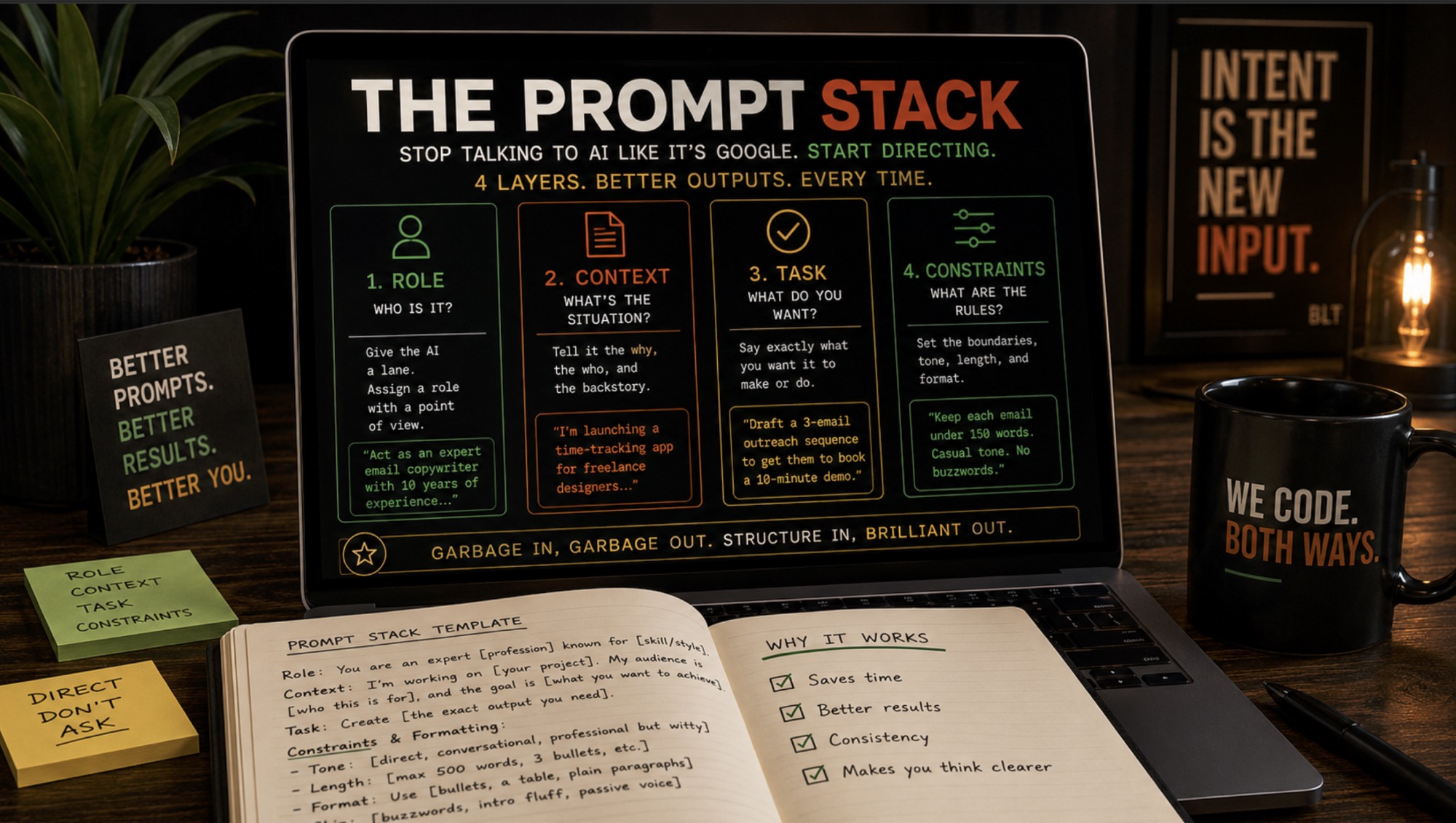
Every strong prompt answers four questions before the AI types a single word: Who is it? What’s the situation? What do you actually want? And what are the rules?
Break it down like this:
- Role. Who is the AI pretending to be?
- Context. What’s the backstory?
- Task. What exactly are you asking it to make?
- Constraints. What are the boundaries and the format?
Miss a layer and you feel it in the output. Let’s walk through each one.
1. Role: Give It a Lane
AI is trained on basically everything, which makes it a generalist. A jack of all trades, master of none. When you assign it a specific role, you force it to stop being everybody and start being someone with a point of view.
Same request. Wildly different output. You just handed it a lens.
2. Context: Tell It the Why and the Who
AI can’t read your mind and it does not know your business. The more it knows about your actual situation, the more relevant the output gets. This is the layer most people skip, and it’s the one that does the most work.
Example: “I’m launching a time-tracking app for freelance designers who keep burning out and undercharging for their work.”
Now the AI knows who it’s talking to and what they’re struggling with. That changes everything downstream.
3. Task: Say Exactly What You Want
Be specific and use strong action verbs. “Help me with marketing” is not a task. It’s a vibe. Tell it what to make.
Example: “Draft a three-email outreach sequence designed to get them to book a ten-minute demo.”
Clear ask, clear deliverable. The AI knows what done looks like.
4. Constraints: Set the Rules and the Format
This is your boundary layer, and it’s where you save yourself from the cheesy corporate AI voice we all know and hate. You know the words. Delve. Testament. Revolutionize. Tell it not to. Tell it how long, what tone, and how to format the final piece.
Example: “Keep each email under 150 words. Casual and empathetic tone. Give me clear subject lines and bold the key hooks. No corporate buzzwords.”
Now it knows the shape of the thing before it builds it.
The Copy-Paste Starter Stack
Here’s the template. Save this, fill in the brackets, and you’re done. Works for code, captions, content plans, meal plans, whatever you’ve got.
Role: You are an expert [profession or specialty] known for [specific skill or style].
Context: I’m working on [your project]. My audience is [who this is for], and the goal is [what you want to achieve].
Task: Create [the exact output you need, like a blog outline, a code snippet, a campaign].
Constraints and Formatting:
- Tone: [direct, conversational, professional but witty, whatever fits]
- Length: [max 500 words, 3 bullets, etc.]
- Format: Use [bullets, a table, plain paragraphs] to organize it.
- Skip: [buzzwords, intro fluff, passive voice]
Why 60 Extra Seconds Changes Everything
Building a stack takes maybe a minute longer than firing off a one-line question. Here’s what that minute buys you.
You save time. No more endless back-and-forth begging the AI to “make it shorter” or “make it sound less like a robot wrote it.” You front-loaded the instructions, so it lands closer the first time.
You get consistency. Code, copy, analysis. Doesn’t matter. Your outputs hold the same quality and the same voice every time, because you’re feeding it the same foundation.
You think clearer. This is the sneaky benefit. Defining your role, context, task, and constraints forces you to figure out what you actually want before the AI gets involved. Half the time the prompt stack teaches you more than the answer does.
The AI is only as good as the direction you give it. Stop asking. Start directing.
Keep your stack pinned somewhere you’ll see it. A note on your desktop, a text expander, the back of your hand. Next time you open an AI tool, paste the stack first, fill in the blanks, and watch your outputs go from beige to brilliant.